1. Vscan Air ™
  2. Solution home
  3. Using Vscan Air
  4. Display Features
Open navigation

Black/white imaging (B-mode)

Learn about Vscan Air B-mode settings for Curved Array (Deep Scanning) Transducer, Linear Array (Shallow Scanning) Transducer and Sector Array Transducer


NOTE: Scanning does not start if the Vscan Air probe is not connected to a Vscan Air app. Black and white (B-mode) imaging is intended to provide two-dimensional images and measurement capabilities concerning the anatomical structure of soft tissue. Black and white (B-mode) imaging is the default scanning mode.
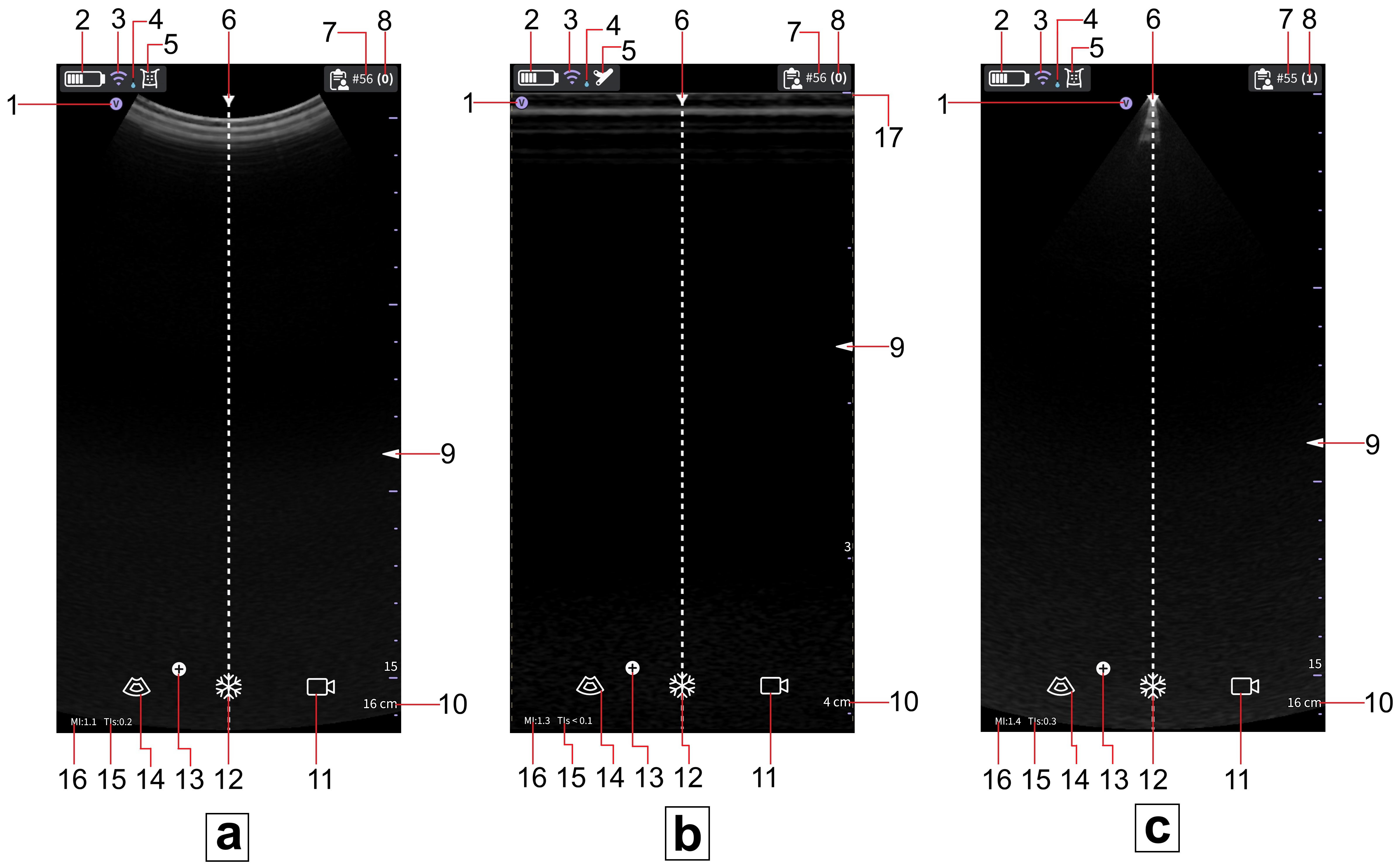

Black/white imaging mode (B-mode)

a. Curved array (deep scanning) transducer

b. Linear array (shallow scanning) transducer

c. Sector array (deep scanning) transducer


  1. Image orientation marker
  2. Vscan Air battery level indicator                                                                                                                           
  3. Wireless connection quality indicator                                                                                                                    
  4. Thermal indicator                                                                                                                                             
  5. Selected preset                                                                                                                                           
  6. Center line marker                                                                                                                                              
  7. Exam number                                                                                                                                          
  8. Number of images and videos in current exam
  9. Focus marker
  10. Depth
  11. Store video   
  12. Freeze 
  13. Additional options button
  14. Color flow
  15. Thermal Index (TI)
  16. Mechanical Index (MI)                                                             
  17. Image crop indicator (yellow dashed line)


Disclaimer: The information herein is not intended to replace the product’s User Manual. Please consult the User Manual for comprehensive information and cautionary guidance about the product’s operation and use.

Was this article helpful?

That’s Great!

Thank you for your feedback

Sorry! We couldn't be helpful

Thank you for your feedback

Let us know how can we improve this article!

Select at least one of the reasons
CAPTCHA verification is required.

Feedback sent

We appreciate your effort and will try to fix the article